
- 软件


/简体中文/

/多语言/

/多国语言/

/简体中文/

/简体中文/

/简体中文/

/简体/

/简体/

/英文/

/简体/
软件Tags:
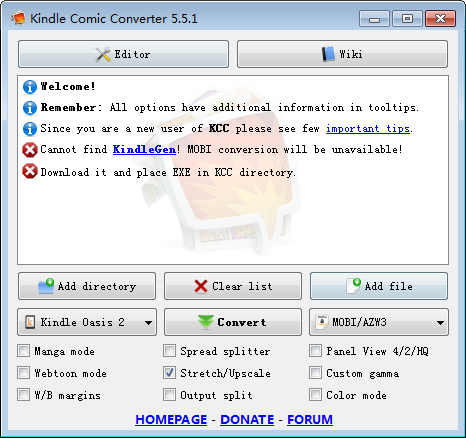
Kindle Comic Converter(漫画转换EPUB工具)是一款能够将漫画转化成文字的软件,通过软件能将常用的图片格式转换成epub或者MOBI格式,方便在各类电子阅读平台进行阅读,有需要的可以下载使用。
软件特色
Kindle Comic Converter (KCC) 是一个可以把 PNG、JPG、GIF、CBZ、CBR 和 CB7 格式的漫画转换成 EPUB 或 MOBI 格式电子书的免费开源软件,制作 E-Ink 设备适用的电子书从此轻而易举。KCC 最初是专门为 Kindle 所开发的,但是现在对 EPUB 3.0 和 CBZ 也有效。此外 KCC 在处理图片时会针对电子墨水显示屏进行全面优化。
KCC 支持 Windows、Mac OS X 以及 Linux 系统平台
功能介绍
Manga mode
连载漫画模式Enable right-to-left reading.
开启从右向左翻页。
Spread splitter
版面分割Unchecked – Split
不勾选 – 分割
Double page spreads will be cut into two separate pages.
Indeterminate – Rotate and split
不定 – 旋转和分割
Double page spreads will be displayed twice. First rotated and then split.
Checked – Rotate
勾选 – 旋转
Double page spreads will be rotated.
Panel View 4/2/HQ
面板视图 4/2/HQUnchecked – 4 panels
不勾选 – 4 个面板
Zoom each corner separately.
Indeterminate – 2 panels
不定 – 2 个面板
Zoom only the top and bottom of the page.
Checked – 4 high-quality panels
勾选 – 4个高清面板
Zoom each corner separately. Try to increase the quality of magnification. Check wiki for more details.
Webtoon mode
Webtoom 连载模式Enable special parsing mode for WebToons.
为WebToons启用特殊解析模式。
stretch/Upscale
拉伸/适应Unchecked – Nothing
未勾选 – 不设置
Images smaller than device resolution will not be resized.
Indeterminate – Stretching
不定 – 拉伸
Images smaller than device resolution will be resized. Aspect ratio woll be not preserved.
Checked – Upscaling
勾选 – 适应
Images smaller than device resolution woll be resized. Aspect ratio will be preserved.
Custom gamma
自定义伽马值Disable automatic gamma correction.
禁止自动调整伽马值
W/B margins
白色/黑色 外边距Unchecked – Autodetection
未勾选 – 自动检测
Color of margins fill will be detected automatically.
Indeterminate – White
不定状态 – 白色
Margins will be filled with white color.
Checked – Black
勾选 – 黑色
Margins will be filled with black color.
Output split
输出分割Unchecked – Automatic mode
勾选 – 自动模式
The output will be split automatically.
Checked – Volume mode
勾选 – 卷模式
Every subdirectory will be considered as a separate volume.
Color mode
颜色模式Disable conversion to grayscale.
禁止转换为灰度。
使用方法
把所有图片集中在一个文件夹内;
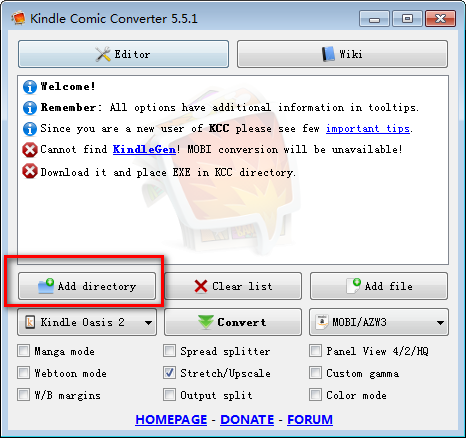
点击【Add directory】把文件夹添加到列表;
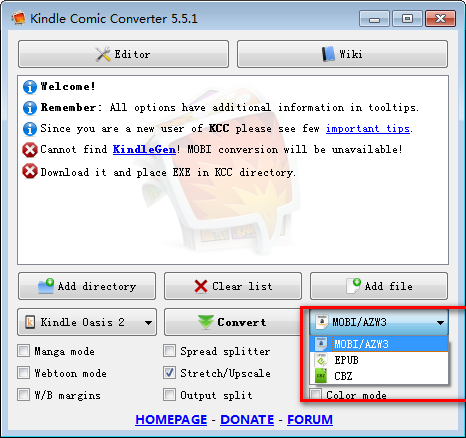
选择 Kindle 设备型号、输出格式(可选 MOBI、EPUB 和 CBZ);
根据需要添加参数,如“Horizontal mobi(横屏模式)”等;
点击【Convert】开始转换。生成的电子书文件和所添加文件夹在同一目录。

猫窝图片格式转换器 v1.0绿色版图片转换 / 137KB Mgosoft PCL To PS Converter v7.3.6官方版图片转换 / 10.4M
 Apeaksoft Free HEIC Converter v1.0.6免费版图片转换 / 11.6M
 萌新矢量图 正式版1.8.189官方版图片转换 / 7.2MBJPEG转CAD v3.6.0.0中文汉化版图片转换 / 1.5M
 图片格式转换助手 v1.3官方版图片转换 / 396KBi2pdf 正式版1.0.46官方版图片转换 / 334.5KB图片格式转换器 正式版3.0.2.3官方版图片转换 / 74.7MB
 Super Vectorizer 正式版2.3.3官方版图片转换 / 9.5MB
 软大师AI图片格式转换 正式版1.9.1.1官方版图片转换 / 32.1MB猫窝图片格式转换器 v1.0绿色版图片转换 / 137KBMgosoft PCL To PS Converter v7.3.6官方版图片转换 / 10.4MApeaksoft Free HEIC Converter v1.0.6免费版图片转换 / 11.6M萌新矢量图 正式版1.8.189官方版图片转换 / 7.2MB
 图像批量缩放工具 v4.3绿色中文版图片转换 / 2.0MJPEG转CAD v3.6.0.0中文汉化版图片转换 / 1.5M图片格式转换助手 v1.3官方版图片转换 / 396KB
 奈末CDR批量转曲助手 v8.6绿色版图片转换 / 2.8M
 Joyoshare LivePhoto Converter v1.0.0免费版图片转换 / 15.2M
 蓝梦图片格式批量转换工具 v1.0绿色免费版图片转换 / 7.8M

 万能图片转换器 v1.0.0官方版
 金山文档 v3.6.4官方版
 有道云协作 v7.1.9官方版
 报名照片处理工具 v2022免费版
 美图秀秀PC版 v7.0.6.4免费版
 虎牙直播助手 v5.34.2.0官方正式版
 腾讯视频电脑版 v11.50.4036.0官方版
 钉钉电脑版 v6.5.20官方版
 洋芋田图像工具箱 v3.5.0免费版
 美图云修 v2.3.1官方版


 Adobe Photoshop 2022图像处理
 纪念币预约助手 v20.12.23免费版网页辅助
 楼月wxid添加微信好友软件系统其它
 柯尼卡美能达6180e驱动 v1.0官方版打印机驱动
 汉印HPRT N31打印机驱动 v1.0官方版打印机驱动
 京瓷ECOSYS M4125idn打印机驱动 v5.1.2213官方版打印机驱动
 鸿业管立得 v2022官方版图像处理
 富士施乐SC2022打印机驱动 v2.1官方版打印机驱动
 启锐QR-368打印机驱动 v2.4.1官方版打印机驱动
 鄂ICP备2026017078号-1